Garry's Mod

Garry's Mod

9,639 ratings
PlayX
3
2
2
   
Award
Favorite
Favorited
Unfavorite
Content Type: Addon
Addon Type: Tool
Addon Tags: Fun, Movie
File Size
Posted
Updated
252.503 KB
3 Nov, 2012 @ 8:41pm
14 Dec @ 5:52am
84 Change Notes ( view )

Subscribe to download
PlayX

In 2 collections by Dathus [BR]
Zion Gamers # Server Addons: SANDBOX
69 items
Dathus [BR]'s Gmod Addons
6 items
Description
PlayX is an advanced media player that can be used to play video/music/images/websites from 16 media providers.

Version: 2.9.19

Disclaimer
There is a bug in Garry's Mod/Awesomium itself that prevents our PlayX (and not only PlayX) to open media randomly, this bug[github.com] was already reported to Facepunch[github.com] but no luck with that until now.

Requirement

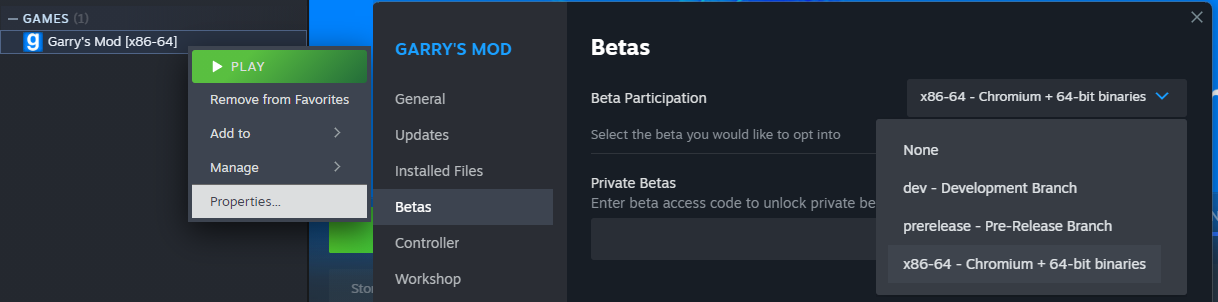
For now to this addon to work you need to use the x86-64 branch.

Some providers only work with CEF Codec fix[github.com]

Mirror
Download from Github[github.com]

Providers
YouTube (live/vod) *
Vimeo *
Soundcloud *
LiveStream
Shoutcast *
Twitch.TV Streams/VODs (Mature may not work) *
FLV/MP4/AAC/WEBM *
Image
MP3 *
RTMP *
Non-browsable webpage
Flash

Current features
Providers: Play videos/music/image/websites from 16 media providers.
PlayX Access: PlayX now support inheritance permissions. ULX[github.com], Evolve[github.com], Exsto[github.com] or SAM admin mod[www.gmodstore.com].
YouTube Query: Use .ytplay chat command to play a YouTube video, the top result of a query, Type: .ytplay Title of The video, example: .ytplay Gmod Idiot Box
Bookmarks: Play videos from your personal bookmark, that you can add, edit and delete URLs.
Navigator: Browse YouTube and other providers to choose easily which video you want to play.
Chat Commands: If anybody post a YouTube video URL in the chat, type: .ytplay to play that video or !playx URL to play any video supported by the providers.
* Pause support: If you want pause a video, just stay way from the player, to play just come near PlayX.
* Volume support: If you think the video volume is too high, just go on PlayX Settings on the Q-Menu -> Options and turn it down.
Full-screen: Once you spawned a Player you can enter/exit full-screen using F11 (changeable on Q-Menu->Options->PlayX->Fullscreen) or using the Context Menu. It may be pixelated

* Providers with volume change and pause support.

Error reports, Issues and suggestions
ONLY Post error reports on Issue Tracker[github.com].

PlayX Community Join NOW!
- Servers with PlayX
- COMMON ISSUES
- GUIDES AND TUTORIALS

Contributors
sk89q, X-Coder, Atomeh, Xerasin, DarthTealc, thegrb93, SwadicalRag, Linux045[github.com], Science, Adam759[github.com],
DathusBR.

CHANGELOG: Workshop or Github[github.com]

Unofficial Add-Ons
Google Drive: https://test1.login.steam.hlxgame.cc/sharedfiles/filedetails/?id=344710649
Emissive Lighting: https://test1.login.steam.hlxgame.cc/sharedfiles/filedetails/?id=2546672106
Bilibili: https://test1.login.steam.hlxgame.cc/sharedfiles/filedetails/?id=2569101717

License
Creative Commons Attribution-NonCommercial-ShareAlike 4.0 International[creativecommons.org]

Permission
If you want to modify PlayX you can! But only upload the modified files.
If you made some fix or improvement you can share your work here, Send a pull request on my GitHub.

Add-on's Rules
1st - Don't upload the whole PlayX folder to steam workshop, Or any other website, (if is not a fork from GitHub).
2nd - Don't remove copyright comments and LICENSE file.
If you break this rules your mod will be taken down!!!

Terms of Service and Privacy Policy
PlayX uses YouTube API to play and search videos, by using PlayX to play YouTube videos you agree with YouTube Terms and Google Privacy Policy[policies.google.com]

Personal Information collection
We don't store, collect or sell any personal information / user information, But we use Google Analytics for anonymous statistics. We don't share user information with any parties at all. We don't use cookies to track user, we don't collect any information from users' devices. We don't serve ads but YouTube does.

Contact Information
ziondevelopers@juliocesar.me

DO NOT ADD ME AT STEAM, IT WILL BE IGNORED.
DO NOT START A NEW DISCUSSION, IT WILL BE DELETED.


I know that ads are annoying, but I cannot add ad-block or custom player to circumvent YouTube's ads because is against the ToS, and google could take down this add-on.

Before post anything, read the description, past comments, steam group topics and GitHub Issues.
3,692 Comments
Sayonara87 17 hours ago 
IT'S WORKING!!! Thank you so much again!!!!111111

But i wanna say that im using PlayX specifically because of the "fullscreen" feature that allows to play videos fullscreen for the whole RP server, just like Cutscenes. And i guess GIF format is the best, as it doesn't show a media player and also can play static images.

Also if i make every gif a 1024x512 i guess the black bars issue won't matter, so it's one more advantage of a gif.
Sayonara87 19 hours ago 
THANK YOU SO MUCH FOR ANSWERING! I'm going to check the issue in 30 minutes and respond if it's fixed for me, brazilian brother!!!
Dathus [BR]  [author] 19 hours ago 
For no black bars in image provider, send an image of 1024x512px: https://test1.login.steam.hlxgame.cc/sharedfiles/filedetails/?id=3623809841
Dathus [BR]  [author] 20 hours ago 
@Sayonara87: Image provider was broken, It is fixed now, but you may get some black bars depending on the size of the image and its aspect ratio: https://test1.login.steam.hlxgame.cc/sharedfiles/filedetails/?id=3623781874
Sayonara87 13 Dec @ 6:06pm 
My ass hurts so much...
Im sorry, but how do i use the "Image" provider? Whenever i copy picture's URL, insert it and press "open media" i just get a black screen. Im on chromium and even installed a codec...

Does it mean i have the aforementioned bug?
Dathus [BR]  [author] 3 Dec @ 9:02am 
@Sora, We need be in beta to PlayX to work as you can see in the top of the description. Sadly it seems to be a an eternal beta. Nothing I can do about it.
Sora 3 Dec @ 8:59am 
Originally forgot to comment, and then my comments got stuck pending. Support cleaned them up for me. Thanks for adding WebM support! I appreciate it!

Can confirm it just works for me. I'm in x86_64 beta without CEF patch. I didn't test without x86_64 beta so it might be a limitation if you're not in beta? Alternatively its likely a codec issue.
Dathus [BR]  [author] 2 Dec @ 8:07am 
@craxxybraxxy you can test here: https://ziondevelopers.github.io/playx/host.html?url=https://raw.githubusercontent.com/mediaelement/mediaelement-files/refs/heads/master/big_buck_bunny.webm replace the github one with yours if plays on the browser probably will play on PlayX on gmod too.
craxxybraxxy 2 Dec @ 8:04am 
ok thank you
Dathus [BR]  [author] 2 Dec @ 8:03am 
@craxxybraxxy, I tested again, is working just fine: https://test1.login.steam.hlxgame.cc/sharedfiles/filedetails/?id=3616630077 if is not working for you, you are doing something wrong.